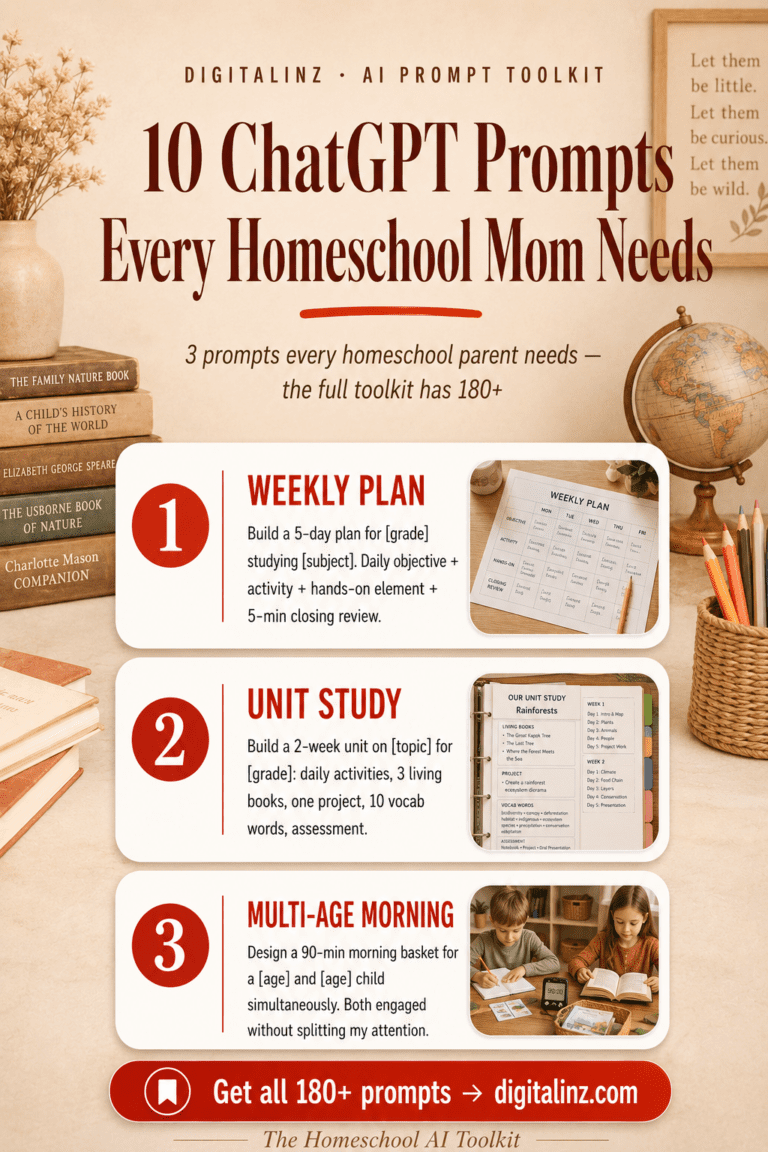
How to Use ChatGPT for Homeschool Lesson Plans You’ll Love
Did you know that the release of OpenAI’s ChatGPT 3.5 marked a turning point, with millions of parents now exploring its potential for education? This powerful language model has become a foundational tool for modern planning at home.
Imagine transforming your daily teaching routine. You can create high-quality, personalized content that captivates your children. This guide will show you the path.
You will discover how to leverage this technology to save precious time. It provides structured information and diverse educational resources at your fingertips.
The goal is to streamline your process. Focus more on the joy of discovery with your students and less on administrative tasks. We will help you integrate AI confidently into your unique journey.
This approach ensures your children receive an engaging academic experience. It’s about enhancing your learning environment with smart, adaptable tools.
Key Takeaways
- OpenAI’s ChatGPT 3.5 serves as a modern foundation for educational planning at home.
- This technology can significantly reduce the time spent on creating lesson content.
- It enables the creation of personalized and engaging material for students.
- You gain access to a wide array of structured information and teaching resources.
- Integrating AI helps streamline teaching so you can focus on interactive learning.
- The guide aims to build your confidence in using these tools effectively.
- Maintaining the integrity of your unique homeschooling approach is a top priority.
Introduction: Embracing ChatGPT in Your Homeschool Journey
Schools like 21K School are already leveraging advanced tech to provide flexible, global education—a model homeschoolers can adopt. This shift brings powerful new tools right into your learning space.
You are not just a teacher but a guide. Your role is to foster understanding and curiosity.
Overview of ChatGPT in Education
ChatGPT is a language model that generates text. It can answer questions, create content, and simulate discussions.
In a recent podcast, Charlotte Jones explored its practical applications. She highlighted how it can enhance the teaching process and improve student outcomes.
This tool acts as a dynamic resource. It provides explanations for complex concepts across all subjects.
Why It Matters for Homeschoolers
For home educators, personalization is key. This technology allows you to tailor lessons to your child’s grade level and interests.
You gain a partner for generating writing prompts and practice problems. It offers immediate feedback, helping students master skills at their own pace.
| Aspect | Traditional Planning | AI-Assisted Planning |
|---|---|---|
| Time Investment | High; manual research and creation | Reduced; quick generation of ideas |
| Resource Variety | Limited to available books and sites | Vast, dynamic pool of information |
| Personalization | Generic, one-size-fits-all often | Highly tailored to student needs |
| Feedback Speed | Delayed until review is complete | Instant explanations and assessment |
| Adaptability | Fixed plans are hard to change | Easy to adjust concepts and difficulty |
This guide helps you harness these advantages. It turns the learning process into an engaging adventure for your children.
Benefits of Using ChatGPT in Homeschooling
The true power of AI in education lies in its dual ability to save time and boost engagement. You gain a versatile partner that transforms your daily routine.
This approach brings tangible advantages to your home classroom. It supports your role as an educator in practical, meaningful ways.
Time-Saving Advantages
You can drastically cut down on hours spent on planning. The tool generates lesson content, practice problems, and materials in moments.
That reclaimed time is a gift. It allows you to focus on direct interaction with your children.
Consider the financial benefit too. Using AI for tutoring can reduce the cost of private educational support by at least 50 percent.
You create efficient lessons without sacrificing quality. The entire process becomes smoother and more manageable.
Enhanced Lesson Engagement
Students stay captivated by the interactive nature of this technology. They receive immediate answers to their questions.
Tailored explanations help clarify difficult concepts. This keeps learning dynamic and responsive.
You can design activities that match individual interests and skills. This personalization is key to sustained attention.
The instant feedback loop encourages mastery. It turns challenging subjects into achievable goals.
Your teaching becomes more about guiding discovery. The right resources and support make all the difference.
Setting Up ChatGPT for Your Homeschool Environment
To make ChatGPT an effective tool for your family, begin by creating a tailored and secure account. This initial step establishes a reliable foundation for your daily educational activities.
A proper setup ensures the AI aligns with your specific teaching goals and safety standards.
Account Setup and Accessibility
Start by visiting the OpenAI website to register for an account. The free ChatGPT 3.5 version is available immediately upon sign-up.
This model saves your entire chat history across different devices. You can access it from a laptop, tablet, or phone anytime.
Such flexibility makes it a perfect fit for varied homeschooling schedules. Whether you follow a traditional routine or a more fluid online approach, the platform is ready.
Customizing ChatGPT Settings
Next, consider creating distinct profiles for each of your children. Input details like their age, grade level, and preferred learning style.
This customization helps the AI generate more relevant information and responses. Always monitor the interactions between your students and the system.
Your oversight guarantees the content meets your academic expectations. Establish clear guidelines for your student to follow during each session.
This creates a safe, controlled space for exploring new topics with confidence.
how to use ChatGPT for homeschool lesson plans
A clear, step-by-step method turns this powerful language model into your most valuable educational partner. This beginner’s guide provides a straightforward path to creating structured lessons.
You will learn to generate organized schedules and engaging materials. The process saves you significant time and effort.
Step-by-Step Guide for Beginners
Start by viewing the AI as a dedicated assistant. Give it detailed instructions and clear goals for your teaching.
For example, with a curriculum like Brave Writer’s Help for High School, copy its table of contents into the system. Ask it to build a 36-week schedule covering all key subjects.
- Provide Specific Prompts: The quality of the content depends on your initial prompts. Describe your student’s grade level and learning needs.
- Refine the Output: If the first response isn’t perfect, ask follow-up questions. This iterative feedback loop sharpens the information.
- Organize Your Resources: Use the generated plan to structure your weekly materials. This ensures you cover necessary concepts and skills.
This approach helps you tailor explanations and practice problems for your children. You become a more effective teacher with a reliable tool.
Creating Personalized Lesson Plans with ChatGPT
Every child learns differently, and with this AI, you can craft lessons that truly resonate with their unique style. This approach mirrors institutions like 21K School, where personalized learning ensures each student meets specific requirements.

Tailoring to Your Child’s Learning Style
First, identify your child’s preferred method: visual, auditory, or kinesthetic. Share these details with the tool when requesting new resources.
The system then generates tailored explanations and practice problems. A visual learner might receive chart-based content, while an auditory learner gets discussion prompts.
Incorporate your child’s passions into the lesson prompts. This makes even challenging subjects feel relevant and sparks curiosity.
Adjust the complexity of the information to match their current grade level. The AI provides content that aligns with their developing skills.
This process fosters deeper understanding and independent thinking. Your children become active participants in their learning journey.
Integrating Curriculum and Resources with ChatGPT
Bringing together classic textbooks and modern digital tools creates a rich, dynamic learning environment for your children. This approach mirrors institutions like 21K School, which complement traditional texts with digital assets to enhance the overall experience.
Blending Traditional and Digital Materials
You can easily merge physical books with online resources. Ask the AI to generate summaries, quizzes, or supplemental reading lists for your students. This bridge between materials provides a cohesive experience for both parent and child.
Leveraging Online Educational Tools
By leveraging these resources, you ensure your curriculum covers a wide range of subjects. The platform helps organize materials and recommend additional books that align with your current unit study.
| Aspect | Traditional-Only Approach | Blended Resource Approach |
|---|---|---|
| Resource Variety | Limited to available textbooks | Combines physical and digital assets |
| Student Engagement | Can be static and predictable | Interactive, dynamic, and adaptive |
| Teacher Support | Relies on manual research and planning | AI-assisted organization and idea generation |
| Curriculum Depth | Often fixed in scope and sequence | Easily expands with online tools and content |
This integration supports your teaching process with a wealth of information. It allows you to tailor lessons to your child’s grade level and develop key skills and concepts.
Generating Engaging Content and Writing Prompts
The secret to captivating young minds lies in transforming routine exercises into personalized, thought-provoking challenges. You can turn standard assignments into exciting adventures that your children genuinely enjoy.
Interactive and Creative Learning Ideas
This powerful tool generates creative writing prompts that challenge your students to think outside the box. These ideas improve composition skills and spark curiosity across all subjects.
Your children receive immediate feedback on their work. This keeps them motivated and engaged in the learning process. You save valuable time on developing materials.
The AI can produce a wide variety of content. From historical fiction scenarios to scientific inquiry questions, it provides rich information for deep understanding.
| Prompt Type | Primary Skill Developed | Engagement Level | Teacher Support Needed |
|---|---|---|---|
| Historical Fiction Scenario | Creative Writing & Research | High | Moderate (context setting) |
| Scientific Inquiry Question | Critical Thinking & Analysis | High | Low (guidance on method) |
| Persuasive Debate Topic | Argumentation & Communication | Medium-High | Moderate (facilitation) |
| Personal Narrative Starter | Self-Expression & Reflection | Medium | Low (encouragement) |
Incorporating these prompts makes daily writing and practice more dynamic. Your role as a teacher shifts towards guiding deeper thinking.
This creative approach ensures students remain active participants. It fosters a true love for writing and builds essential skills for their grade level. Regular assessment and feedback become part of a natural, supportive cycle.
Planning lessons every week takes real energy — and the Homeschool AI Toolkit was built with that in mind. With 180 prompts covering lesson planning, activities, assessments, and more, you’ll spend less time prepping and more time actually teaching.
Enhancing Critical Thinking Skills Through ChatGPT
Moving beyond simple content creation, this tool excels at cultivating deeper intellectual skills. Your goal shifts from delivering facts to teaching students how to evaluate information and reason independently.
This approach builds a foundation for lifelong learning. It turns the educational process into an active investigation.
Developing Problem-Solving Exercises
You can design activities that require logic and application, not just memorization. Prompt the system to generate real-world scenarios where children must use gathered information to find a solution.
These exercises strengthen analytical skills and intellectual independence. Students learn to tackle complex problems with confidence.
Fostering Analytical Discussions
Ask the tool to present multiple perspectives on a historical event or scientific concept. Encourage your students to question which viewpoint is best supported by evidence.
This practice refines their ability to assess the reliability of sources. It leads to richer understanding and more meaningful discussions about challenging subjects.
Using ChatGPT to Simplify Complex Material
Complex academic material doesn’t have to be a barrier to your child’s understanding. This tool excels at translating tough subjects into clear, age-appropriate language.
For example, it can explain the Laws of Thermodynamics to a ten-year-old. The explanations match their grade level and cognitive skills.
You can ask it to simplify dense text passages. Your student grasps main ideas without technical jargon overload.
Request step-by-step breakdowns for math problems. This builds logical thinking beyond just the answer.
You become a more effective teacher with this support. It provides clear information on topics from algebra to coding.
Breaking down concepts into manageable parts maintains confidence. Your children stay engaged in their learning journey.
| Approach | Traditional Method | AI-Assisted Simplification |
|---|---|---|
| Concept Explanation | Relies on textbook definitions | Uses analogies and simple language |
| Text Comprehension | Student reads dense material alone | Provides summarized key points |
| Problem Solving | Shows final answer with minimal steps | Details each logical step clearly |
| Teacher Support | Limited by personal knowledge base | Access to vast explanatory resources |
| Student Confidence | May drop with repeated confusion | Maintained through incremental practice |
This process ensures difficult concepts become accessible. It turns frustration into successful learning moments for your students.
Scheduling and Organizing Daily Lessons with ChatGPT
Building a predictable daily flow helps your children focus on mastering new concepts instead of wondering what comes next. This AI provides the structural information you need to create that consistent rhythm for learning.

Creating Custom Daily Schedules
You start by telling the tool your preferred start and stop times. List the specific subjects your family needs to cover during that time.
Following principles from resources like The Well-Trained Mind, ask it to balance core subjects with electives. The system can organize your day by alternating activity types.
Think of a science experiment block followed by a history reading session. This variety uses different skills and keeps materials fresh.
Provide the ages and grade level of your children. This ensures the schedule is realistic for your student.
It will build in appropriate breaks and physical activity. This organizational support helps you maintain the consistent routine vital for your students‘ success.
Tailoring Lessons Based on Grade Level
Teaching multiple children at home means meeting each one right where they are academically. Your guide to success is content that fits their specific grade level.
This process simplifies your teaching and boosts their understanding. Everyone stays engaged with the same core subjects.
Adapting Content for Different Ages
You can easily adjust a single topic. Ask the tool to rewrite information for a younger or older student.
It modifies the language and complexity of explanations. A history lesson becomes a simple story for a first grader.
For a middle schooler, it adds deeper analysis. This saves you immense time in preparing materials.
Strategies for Mixed-Age Learning
Create tiered assignments from one prompt. Older students explore advanced concepts while younger ones master basics.
You can request tailored reading lists and vocabulary. This differentiation meets individual developmental needs.
Everyone discusses the same theme. Your instruction becomes more efficient and inclusive.
| Approach | Single-Level Focus | Differentiated Strategy |
|---|---|---|
| Content Depth | Fixed for one age group | Tiered for multiple grade levels |
| Student Engagement | May not fit all children | High, as lessons match each student |
| Teacher Workload | Separate plans per level | One core topic with adapted content |
| Skill Development | Uniform practice problems | Targeted skills and thinking tasks |
| Family Learning | Isolated by age | Collaborative discussions on shared subjects |
Using these tips and ideas fosters a supportive environment. Your children progress at their own pace with confidence.
Safety and Best Practices When Using ChatGPT in Homeschooling
While AI offers incredible support, maintaining vigilance over the information it provides safeguards your child’s education. This tool is a powerful assistant, but it requires your thoughtful guide.
You must ensure all content aligns with your educational standards. This creates a secure learning environment for your children.
Verifying AI Information and Avoiding Hallucinations
Remember, this AI has a knowledge cutoff of 2021. Always verify facts about current events with reliable resources.
Be aware of “hallucinations.” The system might present incorrect information with high confidence. Review every piece of generated content before your student sees it.
Teaching your children to fact-check is a valuable practice. It builds their research and critical thinking skills.
- Cross-reference AI answers with trusted websites or books.
- Encourage your students to ask probing questions about sources.
- Model how you, as the teacher, evaluate information for accuracy.
These tips ensure the tool remains a safe, beneficial partner in your homeschool journey.
Exploring ChatGPT for Creative Learning and Beyond
Your homeschool journey can beautifully incorporate the arts, music, and hands-on experiences that spark lifelong passions. This creative learning builds essential skills and brings joy to your daily routine.
Beyond Academics: Arts, Music, and More
This tool helps you explore artistic subjects with your children. Ask it to generate lists of famous classical composers or explain different art techniques.
You receive ready-to-use information for music and art appreciation lessons. This saves you valuable time in gathering resources.
Planning enriching field trips becomes easier. The AI can suggest local museums, historical sites, or science centers based on your area.
These ideas turn simple outings into extended learning adventures. Your students gain real-world understanding of concepts.
This approach nurtures your child’s unique interests and talents. It provides a well-rounded education beyond traditional teaching.
You become a guide to a multifaceted world of discovery. The entire process makes education a joyous experience for your family.
Real-World Applications and Success Stories
Educators like Cindy Blackburn highlight the importance of practical, actionable resources that simplify the teaching process. With a Masters of Education, she focuses on making learning simple for parents and teachers alike.
Many families now use this tool to streamline their daily routine. They report staying organized and focused on their educational goals.
These success stories show that parents can provide a high-quality education. It becomes both flexible and engaging for their children.
By sharing these real-world applications, we hope to inspire you. Experiment with new ways to integrate technology into your home.
The experiences of other homeschoolers offer valuable tips and ideas. With a little practice, you can overcome initial challenges.
You will see tangible benefits in your student‘s progress. The right guide and materials make a significant difference.
This feedback from the community builds confidence. Your children gain a deeper understanding of various lessons.
It saves you precious time while enhancing the overall learning process. You access a wealth of information and content tailored to your child’s level.
These stories prove that effective skills development is within reach. Your homeschool journey can be both successful and joyful.
Conclusion
You now possess a practical framework for integrating smart technology into your daily academic routine. This approach can significantly save you time while enhancing the quality of your children’s learning.
By following this guide, you’ve learned to generate personalized content, simplify complex concepts, and foster critical thinking skills. This builds a deeper understanding for your student.
Remember to treat ChatGPT as an assistant. Refine your prompts and always verify the information provided. This tool supports your unique educational process.
With these strategies, you create a more engaging environment. It supports the needs of your students. Feel empowered to explore the many ways this technology enriches your family’s academic life. A world of dynamic resources awaits your children.
FAQ
Is this AI tool suitable for all grade levels?
How do I ensure the information it provides is accurate?
Can it help me create a schedule or organize our day?
What are some ways to use it for developing critical thinking?
How can I make lessons more engaging for my child?
Can it assist with subjects like art or music?
You love teaching your kids — the planning is just part of the deal. But it doesn’t have to take over your Sundays. The Homeschool AI Toolkit gives you 180 prompts to plan engaging, personalized lessons faster, so you can focus on the joy of teaching.