ChatGPT prompts for homeschool worksheets you’ll love
Did you know that nearly 3 million students in the United States are currently being homeschooled? This number has surged in recent years, highlighting a growing trend towards personalized education. With this shift, parents are seeking innovative ways to enhance their teaching methods.
One powerful tool that can help you transform your daily routine is leveraging advanced technology. By using AI-driven resources, you can create engaging materials that captivate your children’s interest. This comprehensive guide will explore how modern teaching techniques can be seamlessly integrated into your home curriculum.
By utilizing OpenAI’s latest educational tool, you can streamline your learning process. Focus on what truly matters while ensuring your resources are both accurate and effective. Throughout this guide, we will delve into crafting the perfect educational materials that meet your child’s needs.
Additionally, you will discover how to save time while maintaining high standards for your student’s academic progress. Join us as we embark on this exciting journey of learning and teaching!
Key Takeaways
- AI tools can enhance the homeschooling experience.
- Creating engaging materials is easier with technology.
- Streamlined learning processes allow for more focus on key subjects.
- Crafting effective prompts can lead to better educational resources.
- Time-saving techniques help maintain high academic standards.
Introduction to ChatGPT in Homeschooling
In recent years, the trend of personalized education has gained immense popularity among families. This shift highlights the need for innovative resources that can cater to individual learning styles. AI tools, such as ChatGPT, have emerged as powerful allies in this educational landscape.
Using AI as a virtual assistant can significantly enhance your teaching experience. As Charlotte Jones noted in her podcast, this technology supports students during their daily reading, offering tailored responses to their needs. With the right tools, you can generate lesson plans that adapt to your specific classroom dynamics.
Moreover, templates for various subjects, from math to writing, help keep your group organized and focused. Each response from the AI serves as a quick answer to complex questions, allowing you to save time on daily planning. This integration not only streamlines your activities but also encourages engaging discussions among students, improving their language skills.
Understanding the Potential of AI in Homeschool Lesson Planning
Technology is revolutionizing how families approach education at home. By integrating AI into lesson planning, you can create a dynamic learning environment. This approach keeps students engaged and excited about their studies.
Effective lesson planning involves using AI to generate creative ideas that captivate your child’s interest. For instance, you can design a reading activity that enhances language skills while focusing on a specific subject. This not only aids comprehension but also makes learning enjoyable.
By following this guide, you will learn how to generate writing tasks that challenge your child at various levels. Here are some tips:
- Use AI to create interactive activities that promote discussion.
- Incorporate diverse subjects to keep lessons fresh and engaging.
- Utilize examples that resonate with your child’s interests.
- Refine your assessment methods to support each student’s unique needs.
These strategies ensure that your curriculum remains relevant and effective. Remember, the goal is to foster a love for learning while simplifying your planning process.
ChatGPT prompts for homeschool worksheets
The landscape of education is shifting, with more families choosing personalized learning paths. Utilizing AI tools can enhance your teaching methods significantly. You can ask the AI to list important dates and people from the First Crusade, which occurred between 1095 and 1099.
When creating a worksheet for your class, ensure the topic is specific. This way, the student receives an accurate response tailored to their needs. A good teacher knows that providing a clear template helps every student understand the content and answer questions correctly.
You can generate a math worksheet for any grade level by asking the AI to provide a list of practice problems. These resources offer the support your group needs to master complex subjects while keeping the workload manageable for everyone.
By organizing your plan, you can ensure that every word on the page contributes to the overall learning objectives.

| Grade Level | Subject | Example Topic | AI Resource Type |
|---|---|---|---|
| 3rd Grade | Math | Addition and Subtraction | Practice Problems |
| 5th Grade | History | First Crusade | Fact Sheet |
| 7th Grade | Science | Plant Life Cycle | Worksheet |
Step-by-Step Guide to Creating Your First Worksheet with ChatGPT
Creating effective educational materials can be a rewarding experience. Start with a clear prompt that defines the subject, grade level, and specific learning goals. This clarity sets the foundation for your worksheet.
Next, personalize your curriculum to meet your child’s unique needs. Tailoring lessons ensures that each activity resonates with their interests and learning style. For example, if your child enjoys storytelling, consider incorporating writing tasks that allow them to explore new ideas.
Utilizing AI can save you time while refining your lesson plans. This technology helps align your reading and writing lessons with your educational goals. By focusing on these areas, you can create a more engaging learning environment.
Here are some practical tips:
- Use specific examples to create discussion-based activities.
- Encourage critical thinking through open-ended questions.
- Iterate on your prompts to improve the quality of your worksheets.
Remember, the quality of your output depends on the specificity of your initial prompt and your willingness to iterate. As you develop your materials, you’ll find that each step enhances your teaching process.
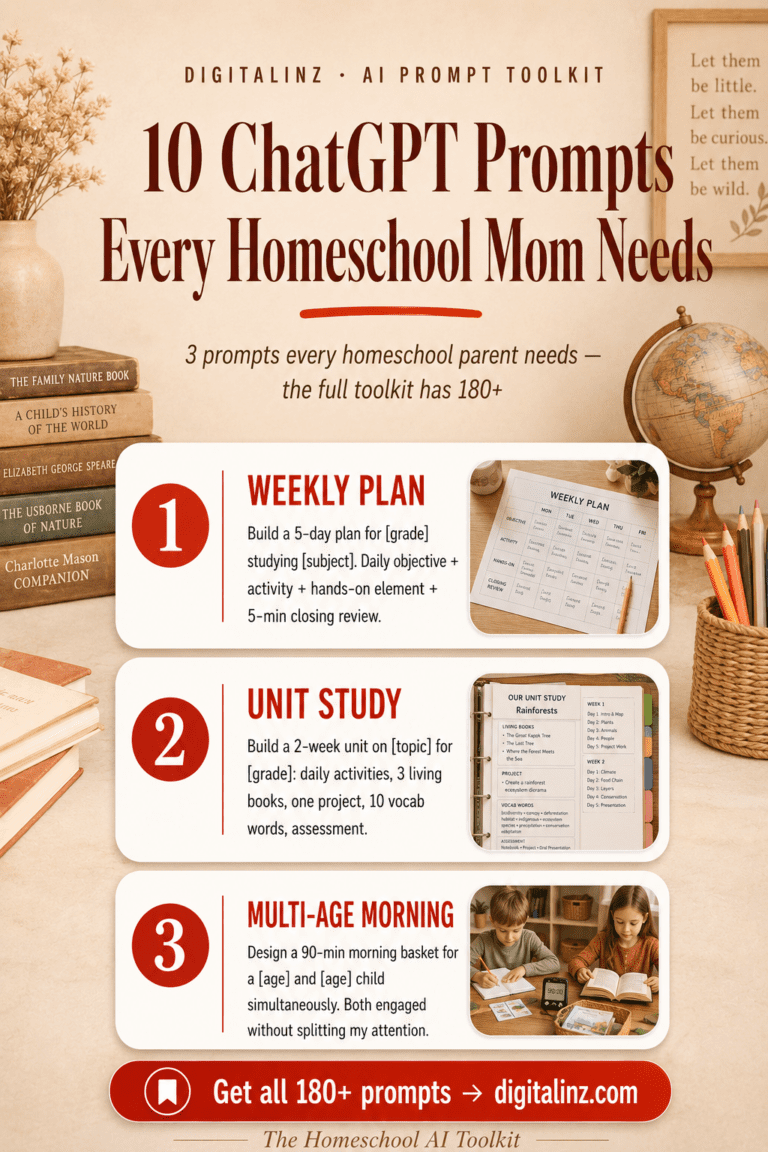
Planning every lesson from scratch is exhausting. The Homeschool AI Toolkit gives you 180 flexible ChatGPT prompts to build activities, assessments, and schedules that actually fit your child — in a fraction of the time.
Using ChatGPT for Different Worksheet Formats
The methods used in education are evolving, allowing for diverse learning formats. One effective way to engage students is through various worksheet types. This approach not only supports their learning but also makes the process enjoyable.
You can use the Britannica resource on mitosis to create a diagram labeling activity that helps your student visualize cell division. This visual aid can significantly enhance their understanding of complex topics.
When designing a matching exercise for your class, ensure the answer key is included at the end of the document. This small detail provides clarity and support for both you and your students.
A well-structured template allows you to generate multiple choice questions that test the student on specific content and vocabulary words. By using ChatGPT to create fill-in-the-gap activities, you provide the support your group needs to master complex language concepts.
These resources are designed to save time, allowing the teacher to focus on providing feedback rather than creating every lesson plan. Whether you are teaching math or history, these examples show how to adapt your prompt to fit any grade level or subject.
Always review the generated content to ensure it meets your standards before you print it for your daily lesson. You can easily organize your planning by keeping a list of these activities in a dedicated folder for future reference.
Personalizing Worksheets with Homeschool Details
Adapting lesson plans to fit each student’s style fosters a deeper understanding of subjects. Personalizing your curriculum ensures that every topic resonates with your child’s unique learning preferences. Here are some effective strategies to enhance your educational approach:
- You can use Brave Writer’s Help for High School as a base and ask AI to create a 36-week schedule for your student.
- By following The Well Trained Mind, you can generate a math and language arts plan that fits the needs of your 3rd and 7th grade children.
- Incorporating Charlotte Mason principles into your prompt will help the AI suggest nature studies and music appreciation for your daily lessons.
- When you customize your curriculum, you ensure that every subject is taught in a way that resonates with your child’s unique learning style.
- These tips help you manage your tasks, allowing you to save time while maintaining a high-quality educational environment.
- Create a template for your weekly schedule that includes specific activities for every grade level in your home classroom.
- By providing the AI with your specific needs, you get a response tailored to your family’s goals and values.
- Always verify the answer provided by the AI to ensure it aligns with your chosen educational resources and standards.
- This guide shows you how to generate ideas for every topic, ensuring your group stays engaged and motivated.
- Whether planning a math lesson or a reading discussion, these examples provide the support you need to succeed.
- The content you generate can be saved and reused, making your planning process more efficient as your student progresses through different levels.
- Remember that the AI is your assistant, so be specific with your prompt to get the best possible results for your class.
Advanced Tips and Best Practices for Effective Prompts
To maximize the benefits of AI in your teaching, it’s essential to be specific with your requests. Treat the AI like an intern, providing clear instructions for each task you assign. This approach ensures you receive the most relevant and useful responses.
Being iterative with your prompts is equally important. Refine your requests until you get the desired output. This process helps you improve the quality of the generated content for your lesson plans.
Learning from examples can enhance your ability to create high-quality materials. By keeping your discussions organized by subject, you allow the AI to maintain context, which aids in generating relevant content.
- Check the accuracy of the AI’s answers, especially for complex topics.
- Create a template for your prompts that includes your child’s grade level and learning needs.
- Being specific is key, whether planning a science activity or a writing assignment.
- Adjust your requests on the fly to create a dynamic learning environment.
Integrating ChatGPT Worksheets into Your Homeschool Curriculum
Integrating technology into your teaching can significantly enhance the learning experience. By aligning your materials with educational standards, you ensure that your student is meeting national educational goals.
This guide shows you how to integrate AI-generated resources into your existing curriculum to support your child’s academic growth. For example, you can align your science worksheets with the MS-LS1-2 standard, which focuses on the function of cells and their parts.
Here are some effective tips to help you:
- Use ChatGPT to create a lesson plan that meets specific standards, saving time and ensuring effective teaching.
- Generate content that is both engaging and academically rigorous for your class.
- Create a template for assessment tasks that tracks progress across different grade levels and subjects.
- Always verify that the AI’s response aligns with your state’s requirements before using it as a primary teaching tool.
- Utilize AI to generate ideas for discussion, helping your group explore complex topics in greater depth.
By organizing your planning, you can ensure that every activity contributes to the long-term success of your student. Regularly review the content you create to keep it relevant to your child’s evolving learning needs.
Overcoming Common Challenges and Managing AI Hallucinations
Navigating the complexities of AI in education can present unique challenges. It’s essential to verify the information provided by AI tools, especially since they may not always reflect current events or facts. With a knowledge cutoff date of 2021, you must confirm any historical or scientific data before incorporating it into your lessons.
This guide offers strategies to refine your prompts if the AI generates incorrect answers or experiences hallucinations. By learning to spot these errors early, you can save time and ensure your curriculum resources remain accurate and reliable.
Here are some effective tips:
- Maintain a list of verified resources to support your student’s learning.
- Use your expertise as a teacher to validate the AI’s content.
- Create a template for your verification process to ensure every worksheet meets high standards.
- Be aware of the AI’s limitations to create a safe learning environment.
Whether planning a discussion or a writing activity, addressing these challenges helps you manage your classroom effectively. By treating AI-generated content as a starting point, you can guide your students through their learning journey.
Time-Saving Strategies: Planning and Implementation
Efficient lesson planning is key to a successful homeschooling experience. You can save time by using AI tools to automate repetitive tasks, such as creating a lesson plan or generating math practice problems. This guide offers tips on how to streamline your planning process so you can focus on teaching your student effectively.
By using a template for your daily activities, you reduce the time spent on administrative work and increase classroom efficiency. These examples show how to use a prompt to generate a full week of curriculum content in just a few minutes.
Organizing your resources by subject and grade level makes it easier to find the right material for your class. Always review the AI’s response to ensure it meets your needs, but use the time saved to provide more personalized support.
Whether planning a reading discussion or a writing assignment, these strategies help you stay organized and productive. By integrating these tools into your routine, you create a more sustainable and enjoyable homeschooling experience for your family.
Remember that the goal is to use AI to support your teaching, not to replace the meaningful interaction you have with your child. The content you generate can be easily adapted for different levels, allowing you to teach multiple children with less effort.
| Task | AI Tool | Benefit |
|---|---|---|
| Lesson Plan Creation | AI Generator | Saves time and ensures alignment with curriculum |
| Math Practice Problems | Math AI Tool | Automates repetitive tasks |
| Resource Organization | Resource Management Tool | Enhances efficiency in lesson planning |
Conclusion
By following this guide, you have learned how to enhance your curriculum and support your student’s unique needs. The most effective teaching happens when you combine your expertise with innovative ideas generated by AI.
You now have the tips and examples needed to create high-quality resources for any subject or grade level. Continue to refine your prompts and verify every response to ensure your classroom remains a place of accurate and engaging learning.
We hope these strategies help you save time and bring more joy to your daily planning and implementation. Embrace this exciting journey and enjoy the process of teaching and learning!
FAQ
How can I effectively use AI in my homeschooling routine?
You can incorporate AI tools to assist with lesson planning, create engaging activities, and provide personalized learning experiences tailored to your child’s needs.
What types of activities can I create using AI?
You can generate various activities, such as quizzes, writing prompts, reading comprehension exercises, and even interactive games that make learning fun.
Is it necessary to have prior experience with AI to get started?
No prior experience is needed! Many AI tools are user-friendly and designed to assist you in creating educational content easily.
How can I ensure the worksheets are suitable for my child’s learning level?
You can customize the content by specifying your child’s grade level, learning objectives, and preferred subjects when creating the worksheets.
What should I do if the generated content doesn’t meet my expectations?
You can refine your requests by being more specific about what you want, or you can ask for adjustments to better fit your needs.
Can I use AI-generated materials alongside traditional teaching methods?
Absolutely! AI-generated materials can complement traditional methods, providing a diverse range of resources to enhance your teaching approach.
How can I verify the accuracy of the information provided?
Always cross-check the information with reliable sources or educational materials to ensure accuracy and relevance.
What are some best practices for creating effective prompts?
Be clear and specific in your requests, and consider breaking down complex tasks into simpler steps to achieve better results.
Your kids are one-of-a-kind learners — and your worksheets should reflect that. The Homeschool AI Toolkit gives you prompts to create custom activities and exercises that actually fit your child’s level and learning style.