ChatGPT Prompts for Quizzes and Assessments (15 Templates, 2026)
ChatGPT prompts for quizzes can generate a full set of multiple-choice, short-answer, and essay questions in minutes — but most teachers get generic output because they don’t tell ChatGPT enough about what they actually need. The difference between a quiz that tests thinking and one that rewards guessing comes down to how the prompt is written. These 15 templates make that distinction concrete.
Why Most AI-Generated Quiz Questions Are Easy to Guess
The problem with generic quiz questions isn’t that they’re wrong — it’s that students can answer them without understanding the material. A well-designed distractor for a multiple-choice question should reflect a specific misconception, not just be a plausible-sounding wrong answer. Bloom’s Taxonomy — the framework for classifying levels of learning — distinguishes between questions that ask students to recall a fact versus questions that ask them to apply, analyze, or evaluate. Without specifying which level you’re targeting, ChatGPT defaults to recall, and recall questions are the easiest to guess on.
The prompts below build Bloom’s level, misconception-based distractors, and format requirements directly into the instructions, so the output is usable without a full rewrite. Once you have assessment questions, pair them with the right ChatGPT prompts for lesson planning to build the instruction that prepares students for them.
15 ChatGPT Prompts for Quizzes and Assessments
Multiple Choice with Strong Distractors
Prompt 1 — Application-level multiple choice:
“You are an experienced [GRADE LEVEL] teacher. Create 5 multiple-choice questions about [TOPIC] at Bloom’s ‘application’ level — questions where students must use what they know to solve a new scenario. For each: write one correct answer and three distractors that reflect common student misconceptions, not just wrong facts. Include a brief answer key with the reasoning. [SUBJECT AREA]”
Prompt 2 — Analysis-level multiple choice:
“Create 4 multiple-choice questions that ask students to analyze [CONCEPT] in [SUBJECT]. Each question should present a scenario or data set and ask students to identify the cause, pattern, or error. Distractors should represent plausible but incorrect interpretations of the same data. Grade level: [GRADE]. Include answer key.”
Prompt 3 — Misconception-based distractors:
“I’m writing a multiple-choice question about [CONCEPT]. The correct answer is [CORRECT ANSWER]. Generate 3 distractors for this question that reflect the most common student misconceptions about this topic in [SUBJECT] at [GRADE LEVEL]. Explain why each distractor is wrong in the answer key.”
True/False and Short Answer
Prompt 4 — True/False with justification:
“Create 6 true/false questions about [TOPIC] for [GRADE LEVEL] students. Each question should require students to explain their answer in 1–2 sentences — not just circle T or F. Mix 3 true and 3 false statements. Include the correct answer and a model explanation for each.”
Prompt 5 — Short-answer questions by skill:
“Write 5 short-answer questions about [TOPIC] in [SUBJECT] for [GRADE LEVEL]. Target: 2 recall questions, 2 application questions, and 1 synthesis question. Each answer should take about 3–5 sentences. Include model answers and a scoring rubric for each question.”
Prompt 6 — Vocabulary assessment questions:
“Create a 10-question vocabulary assessment for [UNIT/TOPIC] at [GRADE LEVEL]. Format: 5 matching questions (term to definition), 3 use-in-context questions (write a sentence using the term correctly), and 2 application questions (explain when you would use this term in a real situation). Include an answer key.”
Essay and Constructed Response
Prompt 7 — Essay prompt with rubric:
“Write an essay prompt for [GRADE LEVEL] students about [TOPIC or THEME] in [SUBJECT]. The essay should require students to use at least [NUMBER] pieces of evidence and make an arguable claim. Include a 4-point rubric covering: claim, evidence, reasoning, and organization. Estimated length: [WORD COUNT] words.”
Prompt 8 — Document-based question (DBQ):
“Create a document-based question (DBQ) for a [GRADE LEVEL] [SUBJECT] class on [TOPIC]. Include: an overarching question, 3 brief primary source excerpts (you can write representative examples), and 2 document analysis sub-questions per excerpt. Final prompt: a 3-paragraph constructed response using evidence from all three documents.”
Prompt 9 — Compare-and-contrast essay question:
“Write a compare-and-contrast essay prompt for [GRADE LEVEL] students comparing [CONCEPT A] and [CONCEPT B] in [SUBJECT]. Include: the essay question, a graphic organizer template students can use to plan their response, and a 3-point rubric. Minimum 3 similarities and 3 differences expected.”
Formative Assessment and Exit Tickets
Prompt 10 — Exit ticket questions:
“Create 5 exit ticket questions for a [GRADE LEVEL] lesson on [LESSON TOPIC]. Format: one question per minute of class time remaining. Include: 1 recall question (what did we learn?), 2 comprehension questions (explain or give an example), 1 application question (how would you use this?), and 1 reflection question (what are you still unsure about?). Keep each answer to 2–3 sentences max.”
Prompt 11 — Diagnostic pre-assessment:
“Create a 5-question diagnostic assessment to give students before teaching [UNIT TOPIC] to [GRADE LEVEL]. Questions should reveal: what prior knowledge students bring, common misconceptions to address, and vocabulary gaps. Include answer key and notes on what each answer pattern reveals about student readiness.”
Prompt 12 — Think-pair-share question set:
“Write 4 think-pair-share questions for a [GRADE LEVEL] lesson on [TOPIC]. Each question should have three versions: (1) an individual thinking prompt, (2) a discussion prompt for pairs, and (3) a whole-class sharing question that escalates to a higher Bloom’s level. Subject: [SUBJECT].”
Review and Test Prep
Prompt 13 — Unit review question set:
“Create a 20-question unit review for [GRADE LEVEL] students covering [UNIT TOPIC]. Distribution: 8 multiple-choice (recall and application), 6 short-answer (explain or apply), 4 true/false with justification, and 2 essay prompts. Include full answer key. Subject: [SUBJECT].”
Prompt 14 — Test prep practice problems:
“Write 10 practice problems for [GRADE LEVEL] students preparing for a standardized test in [SUBJECT]. Align questions to [STANDARD or SKILL]. For each question: include the correct answer, the skill it tests, and a hint students can use if stuck. Format for self-study — students should be able to check their own work.”
Prompt 15 — Common errors correction exercise:
“Create a ‘fix the mistakes’ quiz for [GRADE LEVEL] students on [TOPIC]. Write 8 statements or worked examples that each contain one deliberate error — some factual, some procedural, some conceptual. Students must identify and correct the error. Include the correct version and an explanation of why the original was wrong.”
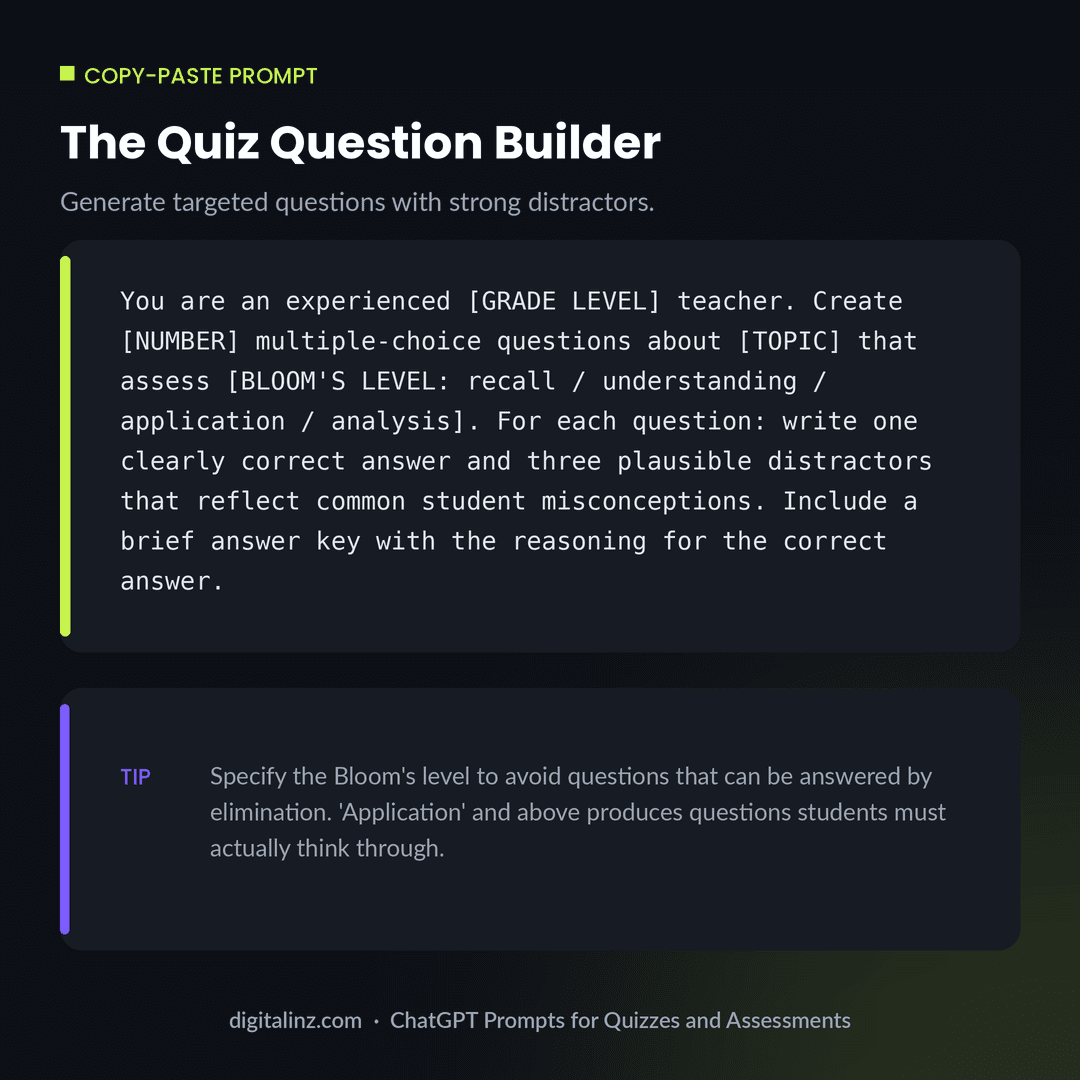
Copy-Paste: The Quiz Question Builder
Start here for any subject and grade level — customize the Bloom’s level and topic to match what your students are being assessed on.
Before and After: Guessable vs. Well-Crafted Question
Same topic, same format — one question rewards guessing, one requires actual understanding.
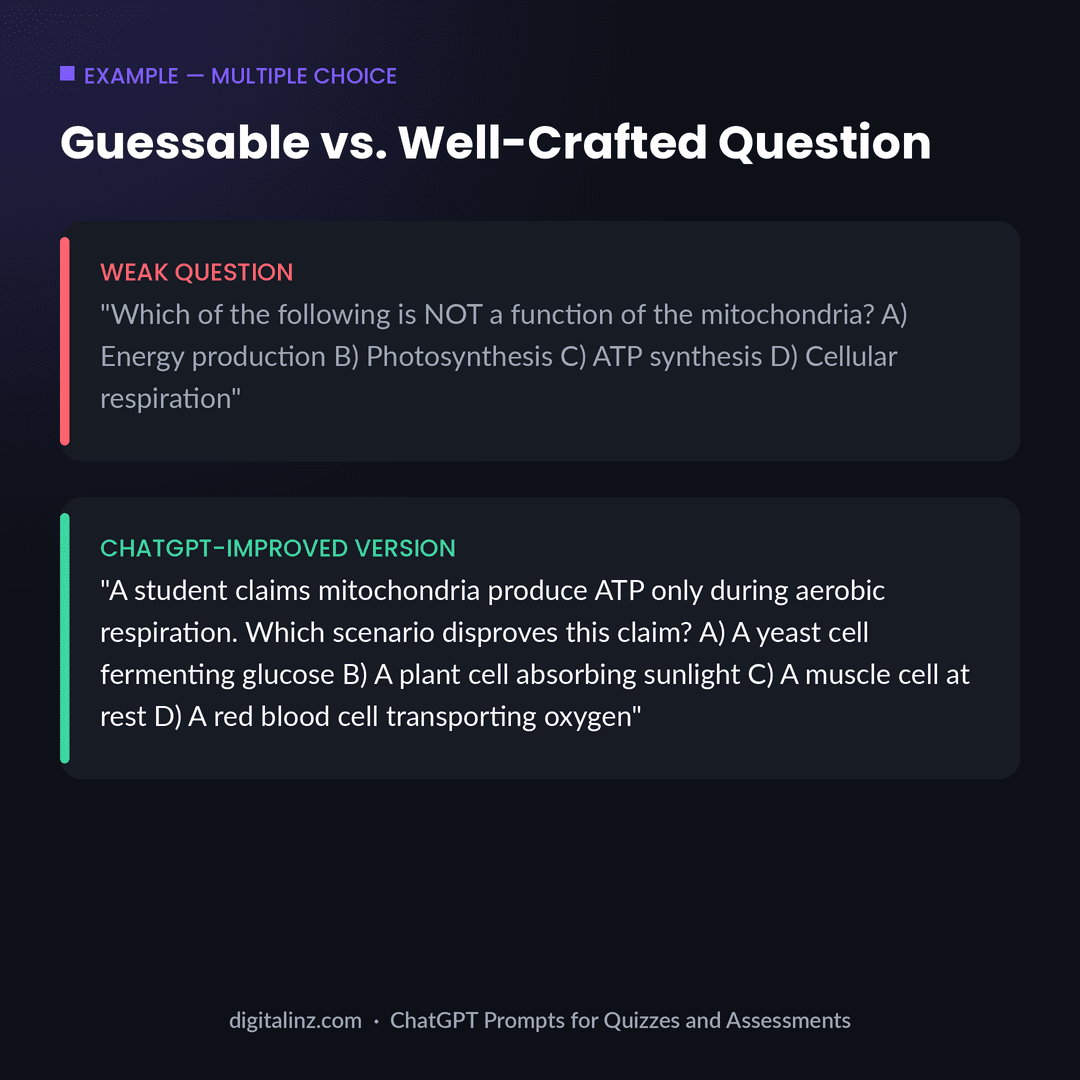
The weak version can be answered by elimination: photosynthesis clearly happens in chloroplasts, not mitochondria, so the student doesn’t need to know anything else. The improved version requires the student to apply their understanding of cellular respiration to a new scenario — the kind of question that reveals whether they actually learned the concept. Using ChatGPT prompts for quizzes with a Bloom’s level specified is what makes the difference.
FAQ: ChatGPT Prompts for Quizzes and Assessments
Can ChatGPT write quiz questions for any subject?
Yes — ChatGPT can generate quiz questions for virtually any K–12 or higher education subject. The quality improves significantly when you specify the grade level, Bloom’s taxonomy level, and the specific misconceptions students commonly have. Without those details, you’ll get generic recall questions.
How do I make sure ChatGPT quiz questions aren’t too easy?
Specify a Bloom’s level above “recall” — application, analysis, or evaluation. Also ask for distractors based on common student misconceptions rather than just plausible wrong answers. The Quiz Question Builder prompt above does both.
Should I use ChatGPT quiz questions directly or edit them first?
Edit them first. ChatGPT produces strong first drafts, but some questions may be ambiguous, have two defensible answers, or miss subject-specific nuances. Always read through the full answer key and test the distractors mentally before using questions with students.
Can ChatGPT write rubrics for essay and constructed response assessments?
Yes — prompts 7, 8, and 9 above generate rubrics alongside the prompts. Specify the number of points per criterion and the grade level so the rubric language matches what you’d actually write on student work.
The Shortcut
Building a question bank across every unit and grade level takes more than a few afternoon sessions. Our Teacher AI Toolkit includes 200+ ready-to-use prompts for quizzes, lesson plans, differentiation, parent communication, and more — all organized by task so you can find what you need in seconds.
Also available on Gumroad.