How Long Should a ChatGPT Prompt Be? 4 Length Rules (2026)
How long should a ChatGPT prompt be? There’s no fixed word count or character limit that produces better answers. A two-sentence prompt can outperform a 200-word one, and a long prompt can still fail completely. What actually determines quality is whether the prompt includes the information the model needs — not how many words it took to say it.
Is There an Ideal ChatGPT Prompt Length?
No single length works best across tasks. A prompt that’s right-sized for “summarize this email in two sentences” would be wildly overbuilt, and a prompt that’s right-sized for “draft a client proposal with specific sections, tone, and constraints” would be far too short if it were only one line.
The closest thing to a rule is this: a prompt is the right length when it contains everything the model needs to know to do the task the way you want — role, context, format, and constraints — and nothing more. Anything beyond that is padding; anything less is a guess.
Why Length Isn’t the Real Question
It’s easy to assume that more detail automatically means a better prompt, but length and usefulness aren’t the same thing. A long prompt that repeats itself, buries the actual task in unnecessary backstory, or never specifies a format can still produce a generic answer — while a short prompt that builds on context already established earlier in the conversation can work perfectly.
The real question isn’t “how long should this be?” — it’s “does this prompt give the model what it needs to know to produce the output I want?” Sometimes that takes one sentence. Sometimes it takes a structured paragraph. The length is a side effect of the answer, not the goal itself.
4 Rules for Right-Sizing a ChatGPT Prompt
1. Match length to task complexity
A one-line task doesn’t need a paragraph of setup, and a multi-part deliverable can’t be compressed into one line without losing the details that make it useful. Before writing the prompt, ask how many decisions the model has to make on its own — the more decisions, the more it needs spelled out.
Example: “Fix the typo in this sentence” needs nothing more than the sentence itself. “Write a job posting for a remote customer support role” needs role, seniority, tone, must-have requirements, and format — because there are dozens of ways to write that posting, and the model can’t guess which one you want.
2. Front-load the most important instruction
When prompts get long, the model can lose track of which instruction matters most if everything is presented with equal weight. Putting the core task and any non-negotiable constraints near the start (or repeating them at the end) makes them harder to miss, especially in longer prompts.
This lines up with general guidance on structuring prompts — Anthropic’s own prompt engineering documentation emphasizes putting the most important context and instructions where the model is most likely to weigh them heavily, rather than burying them in the middle of a wall of text.
Example: Instead of ending a long prompt with “…and please keep it under 150 words,” state the word limit in the first sentence: “Write a 150-word product description for…” — then add supporting details after.
3. Use line breaks and labels, not one block of text
Two prompts can contain the exact same information and perform differently just because of formatting. A wall of text forces the model to parse out what’s context, what’s the task, and what’s a constraint. Breaking those into labeled sections — Context:, Task:, Format:, Constraints: — makes the same content easier to follow without adding a single extra idea.
Example: “Context: this is for a SaaS onboarding email. Task: write a follow-up for users who haven’t logged in after 3 days. Format: under 100 words, casual tone. Constraints: no discount offers” is the same length as a paragraph version of the same request, but far less likely to be misread.
4. If a prompt keeps growing, turn it into a template
If you find yourself rewriting a long, detailed prompt for the same type of task over and over, that’s a signal the prompt has outgrown being a one-off message. At that point, the better move isn’t to keep typing it out — it’s to save it as a reusable template with blanks for the parts that change. That’s the core idea behind moving from prompting to prompt engineering: building something once that produces a consistent result every time.
Example: A recruiter who repeatedly writes detailed prompts for job postings can turn that prompt into a template with placeholders for role title, seniority, must-haves, and tone — keeping the structure long enough to be useful, but never starting from scratch.
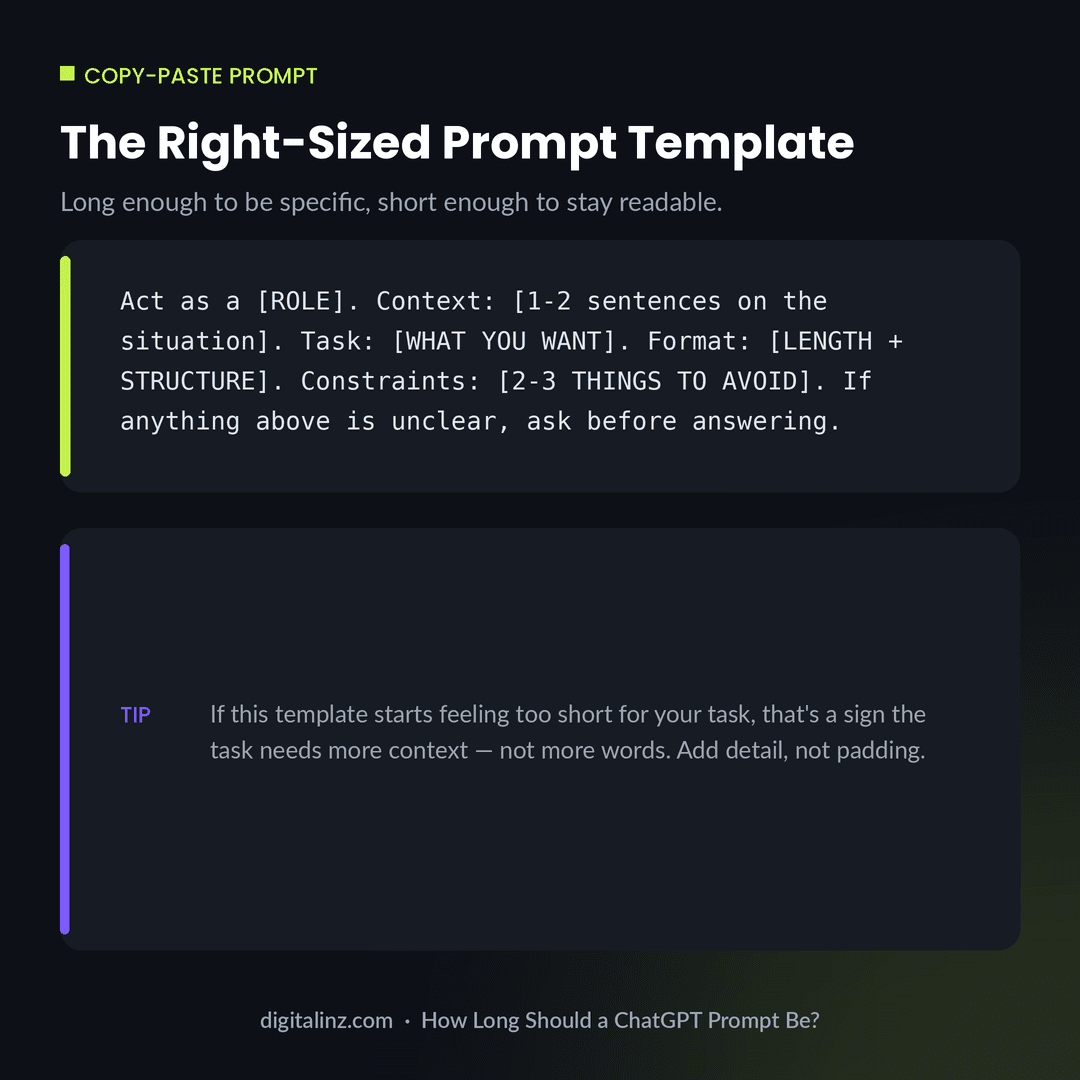
Copy-Paste: A Right-Sized Prompt Template
This template is built to scale with the task — fill in only what’s relevant, and it stays concise for simple requests and complete for complex ones.
Before and After: Same Task, Different Length
Here’s the same request — a LinkedIn post about a product launch — first as a short, vague prompt, then as a slightly longer one that’s actually structured.
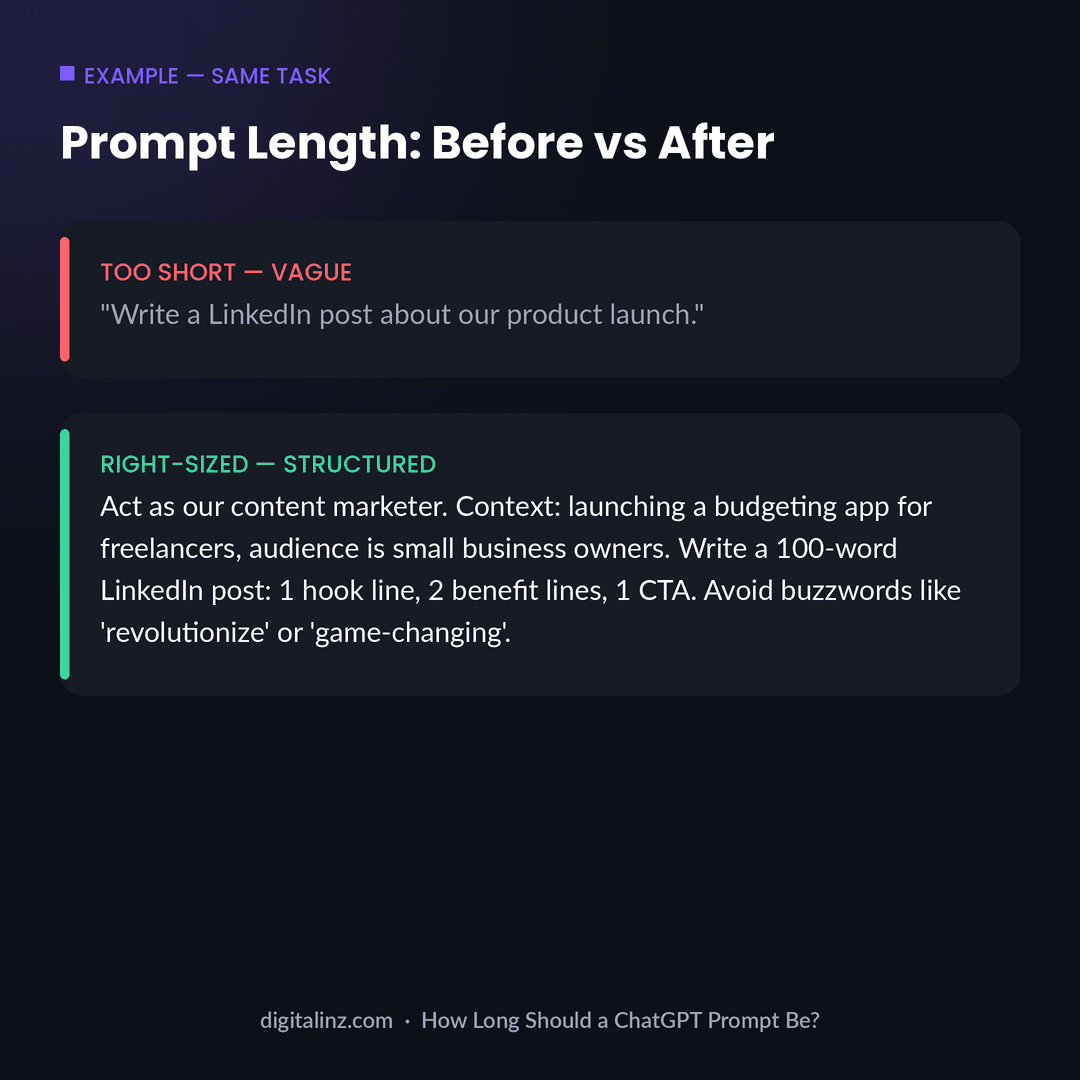
The “after” version is longer, but every added word does work: it names a role, gives the model an audience, specifies a word count and structure, and rules out the kind of generic phrasing that tends to show up by default. None of that is filler — and notice it doesn’t add a role just to add one, the way role prompting can when the role isn’t specific enough to matter.
FAQ: ChatGPT Prompt Length
Is there a maximum length for a ChatGPT prompt?
ChatGPT can handle very long prompts — thousands of words — but most tasks don’t need anywhere close to that. The practical limit is usually how much context the task genuinely requires, not the model’s technical limit.
Is a longer prompt always better?
No. A long prompt that’s still vague performs worse than a short, specific one. Length only helps when it’s adding information the model needs — context, format, or constraints — not when it’s padding.
Can a one-sentence prompt work well?
Yes, especially for simple tasks or follow-up questions where context already exists in the conversation. A one-line prompt like “shorten this to two sentences” works fine because the context is already established.
How do I know if my prompt is too long?
If you’re repeating yourself, adding examples that don’t add new information, or the instructions are hard to scan, it’s time to restructure with labels and line breaks — or save it as a reusable template.
The Shortcut
Working out the right length and structure for every prompt takes time most people don’t have. Our AI prompt toolkits do that work for you — every prompt is already right-sized, with the role, context, format, and constraints built in.
Pick the one that matches your work: The HR AI Toolkit for HR and recruiting, The Teacher’s AI Toolkit for K-12 educators, AI-Powered Practice Prompts for therapists, or the Social Media Manager AI Prompt Vault for content and social teams.
Prefer to browse everything in one place? All of our prompt packs are also available on Gumroad.