ChatGPT Prompts for Parent Emails (15 Templates, 2026)
ChatGPT prompts for parent emails can turn a teacher’s rough notes into a clear, warm, under-150-word message in under two minutes — without sounding like a form letter. The reason most AI-generated parent emails feel robotic is that teachers ask for an email without giving ChatGPT any real information to work with. These 15 prompts solve that by building the student’s name, the specific situation, and the tone directly into the instruction.
Why Parent Emails Sound Robotic Without the Right Prompt
Generic parent emails fail for the same reason generic ChatGPT output fails: the more vague the input, the more vague the output. “Write a concern email to a parent” produces “Dear Parent/Guardian, I am writing to inform you…” — language that could have been sent to anyone. Specific input — the student’s name, what happened in class, one concrete example, and the action you’re requesting — produces an email that actually sounds like you wrote it.
Strong family-school communication also makes a measurable difference. The National PTA’s Standards for Family-School Partnerships identify regular two-way communication as one of the six foundations of effective parent engagement. These prompts make it easier to maintain that communication consistently across an entire class — not just when a problem is urgent enough to push through the mental effort of writing from scratch.
15 ChatGPT Prompts for Parent Emails
Progress and Academic Updates
Prompt 1 — Mid-unit academic update:
“You are a [GRADE LEVEL] [SUBJECT] teacher. Write a brief, warm email to [PARENT NAME] updating them on [STUDENT NAME]’s progress in our current unit on [TOPIC]. Key points: [LIST 2–3 OBSERVATIONS — strengths, areas to work on, recent class performance]. Keep it under 150 words, end with a specific suggestion for how they can support learning at home.”
Prompt 2 — Low-grade or missing work alert:
“Write a professional, non-alarming email to [PARENT NAME] letting them know that [STUDENT NAME] has a current grade of [GRADE] in [SUBJECT] due to [SPECIFIC REASON — missed assignments, low quiz scores, etc.]. Frame it as an update, not a punishment. End with 1–2 concrete steps the student and parent can take before [DATE]. Tone: warm but clear. Under 150 words.”
Prompt 3 — Reading level or assessment results summary:
“Write a parent-friendly summary of [STUDENT NAME]’s recent assessment results to send to [PARENT NAME]. Assessment: [NAME OF ASSESSMENT]. Results: [BRIEF SUMMARY — reading level, score, percentile, or descriptive result]. Explain what the results mean in plain language, what we’ll do next in class, and one thing the parent can do at home. Avoid jargon. Under 180 words.”
Behavior and Concern Emails
Prompt 4 — Behavior concern (first contact):
“Write a first-contact email to [PARENT NAME] about a recurring behavior issue with [STUDENT NAME] in [CLASS/SUBJECT]. The behavior: [DESCRIBE SPECIFICALLY — e.g., calling out during instruction, difficulty staying on task, conflicts with peers]. Frame this as sharing an observation, not a complaint. Acknowledge the student’s strengths first. End with a question inviting the parent’s perspective. Under 180 words.”
Prompt 5 — Bullying or peer conflict concern:
“Write a sensitive, fact-based email to [PARENT NAME] informing them of a peer conflict involving [STUDENT NAME] at school. What happened: [BRIEF FACTUAL DESCRIPTION]. Avoid blame and charged language. Explain the steps the school has already taken, invite the parent to respond, and include the next scheduled check-in. Keep it under 200 words.”
Prompt 6 — Attendance or tardiness concern:
“Write a caring, non-accusatory email to [PARENT NAME] about [STUDENT NAME]’s attendance or tardiness pattern. Facts: [NUMBER OF ABSENCES/TARDIES] in [TIME PERIOD], impact on learning: [BRIEF DESCRIPTION]. Express concern for the student, acknowledge the parent may be dealing with factors outside the classroom, and invite a conversation. Under 150 words.”
Conference and Meeting Requests
Prompt 7 — Parent-teacher conference invitation:
“Write a friendly email to [PARENT NAME] inviting them to a parent-teacher conference for [STUDENT NAME]. Include: the purpose of the conference (to celebrate growth and discuss next steps), 3 available times [LIST TIMES], how long it will take, and how to confirm. Tone: welcoming and low-pressure. Under 120 words.”
Prompt 8 — Urgent meeting request:
“Write a brief, calm email to [PARENT NAME] requesting an urgent meeting about [STUDENT NAME]. Reason: [BRIEF DESCRIPTION — concern about wellbeing / significant academic issue / IEP review needed]. Do not alarm unnecessarily, but convey the importance of meeting soon. Offer 2 times this week and ask them to suggest an alternative if those don’t work. Under 130 words.”
Prompt 9 — Follow-up after a conference:
“Write a follow-up email to [PARENT NAME] after our recent conference about [STUDENT NAME]. Summarize: [2–3 KEY ACTION ITEMS WE AGREED ON]. Thank them for their time and partnership. Include a check-in date to see how things are going. Warm, brief, forward-looking. Under 120 words.”
Celebration and Positive Updates
Prompt 10 — Student achievement shoutout:
“Write a short, enthusiastic email to [PARENT NAME] celebrating something specific [STUDENT NAME] did or achieved this week: [DESCRIBE THE SPECIFIC WIN — scored 100% on a test, helped a classmate, contributed a great idea in discussion, showed real improvement]. Make it feel personal, not generic. Parents should be able to share it with the student. Under 100 words.”
Prompt 11 — Effort and growth recognition:
“Write a positive email to [PARENT NAME] recognizing [STUDENT NAME]’s growth in [SKILL or AREA] over [TIME PERIOD]. Be specific about where they started and where they are now: [BRIEF CONTEXT]. This isn’t about a test score — it’s about effort and improvement. End with one thing the family can acknowledge or reinforce at home. Under 130 words.”
Prompt 12 — End-of-unit celebration email:
“Write a short celebration email to parents at the end of our [SUBJECT] unit on [TOPIC]. Highlight 2–3 things the class did well collectively. Mention one artifact or project students are bringing home. Keep the tone proud and warm. This goes to all families, so keep it general — no individual names. Under 120 words.”
Logistics, Reminders, and Year Transitions
Prompt 13 — Event or deadline reminder:
“Write a friendly reminder email to parents about [EVENT or DEADLINE — field trip permission slip, project due date, testing week, supply request]. Include: what it is, what the parent needs to do, the deadline, and who to contact with questions. Keep it brief — under 100 words. Bullet points okay for the action items.”
Prompt 14 — End-of-year transition message:
“Write a warm end-of-year email from me ([TEACHER NAME]) to families in my [GRADE LEVEL] class. Thank them for their partnership this year, highlight 1–2 things our class accomplished, and wish students a meaningful summer. If they’re moving to a new grade, acknowledge the transition briefly. Under 150 words. No clichés like ‘it’s been a journey.'”
Prompt 15 — Welcome email for new school year:
“Write a warm welcome email to families in my new [GRADE LEVEL] [SUBJECT] class. Introduce myself briefly ([YOUR NAME, BACKGROUND — 1–2 sentences]). Share 2–3 things families should know about how this class works. Include: how I prefer to communicate, what supplies students need, and one thing I’m looking forward to this year. Under 200 words. Approachable and specific, not corporate.”
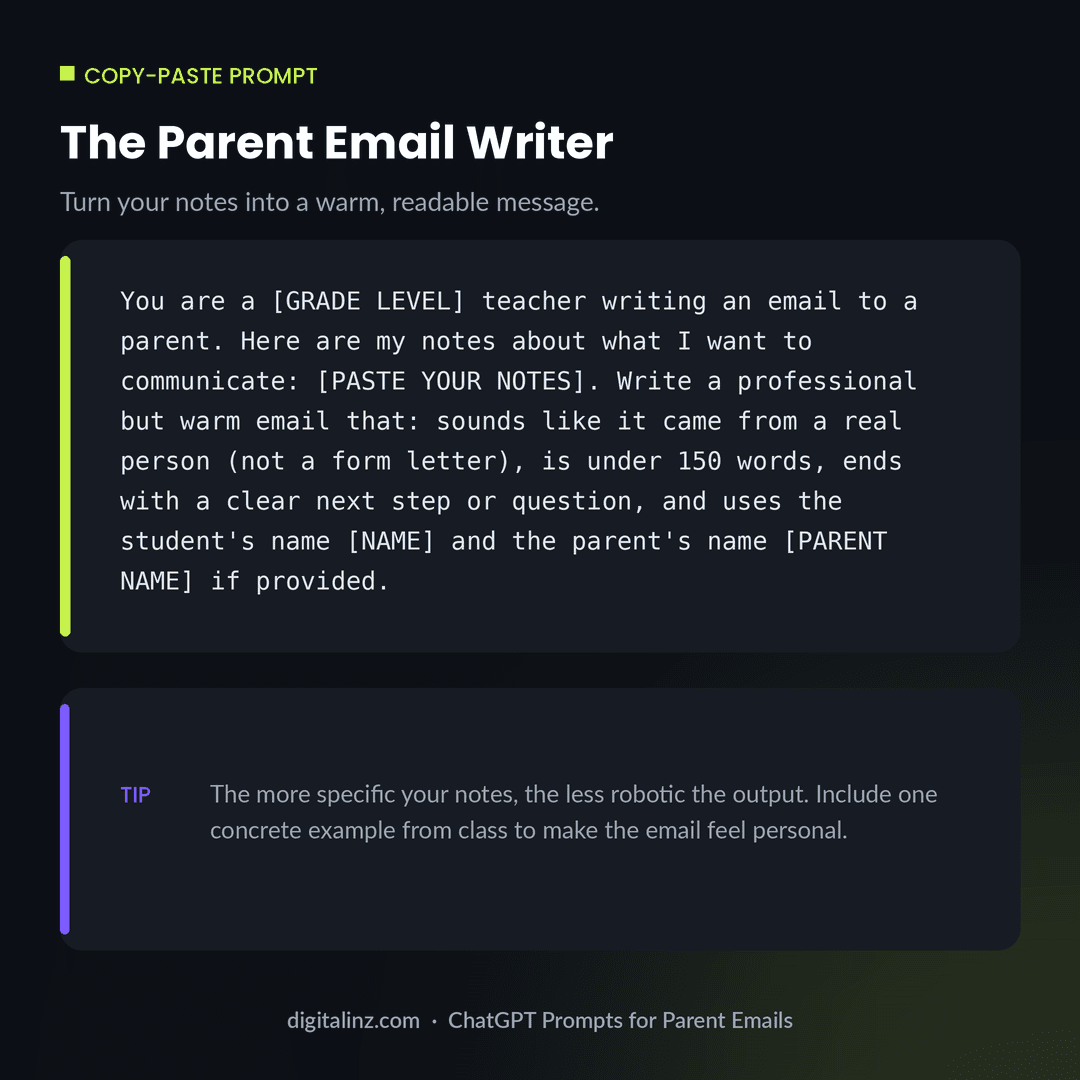
Copy-Paste: The Parent Email Writer
This is the foundation prompt — use it for any email type by swapping out your notes in the bracket.
Before and After: Robotic vs. Human-Sounding Email
Same situation — a student struggling with math — but one email sounds like it came from a person, and one sounds like it came from a mail merge.
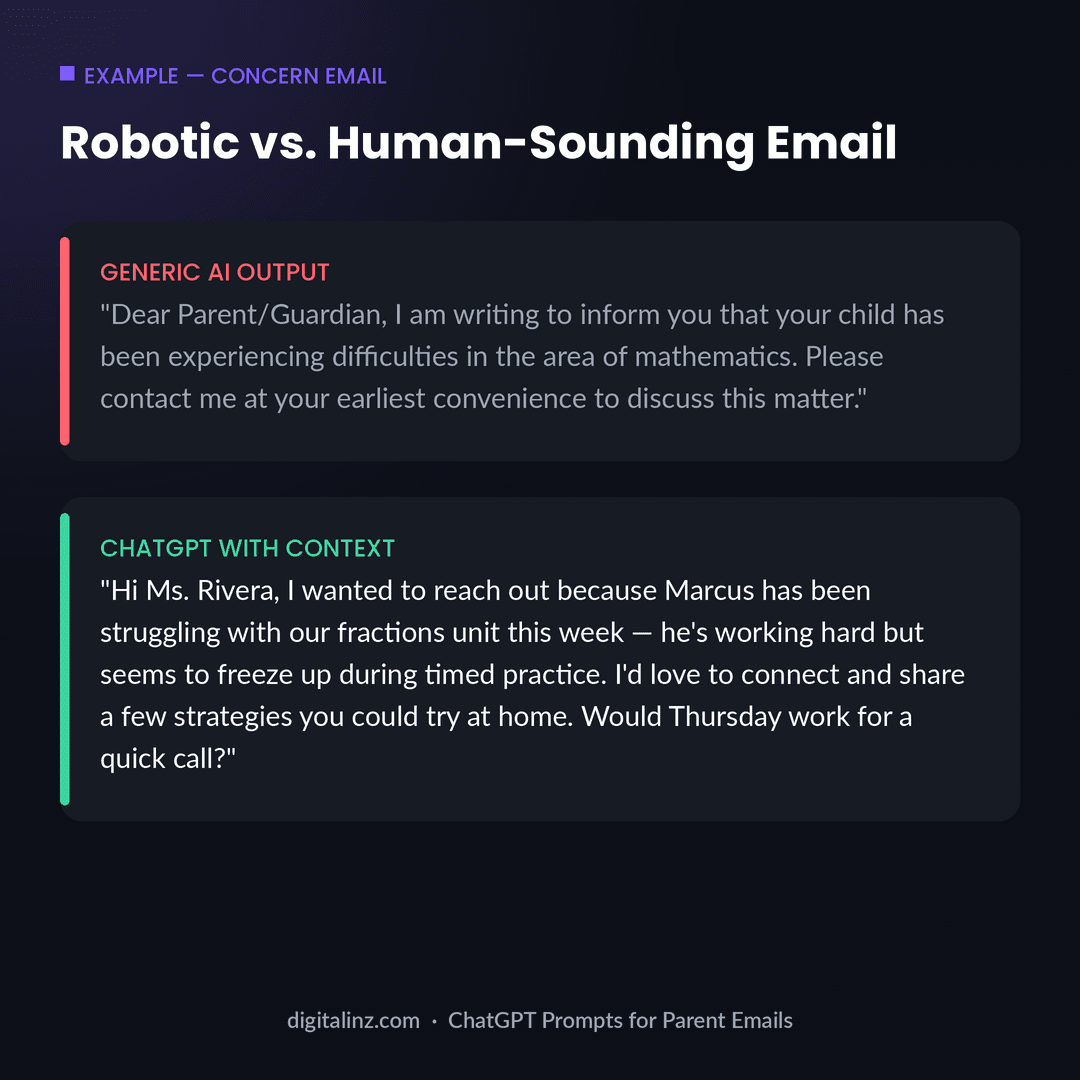
The difference is entirely in what the teacher provided. The generic version gave ChatGPT nothing to work with — no name, no specific problem, no action step. The human-sounding version gave ChatGPT the student’s name, a specific observation from class, and a clear ask. Using ChatGPT prompts for parent emails this way means the teacher stays in control of the content — ChatGPT just handles the drafting. For an even more personal touch on the differentiation side of what you’re communicating, pair this with ChatGPT prompts for differentiation to explain what accommodations the student is working with.
FAQ: ChatGPT Prompts for Parent Emails
Can ChatGPT write parent emails that don’t sound like AI?
Yes — if you give it specific information. A prompt that includes the student’s name, a concrete observation from class, and the tone you want will produce an email that sounds like you. The robotic output comes from vague prompts, not from ChatGPT’s limitations.
Is it appropriate for teachers to use ChatGPT to write parent emails?
Yes. ChatGPT is a drafting tool — the teacher reviews, edits, and sends the email from their own account. The same way a teacher might use a template, ChatGPT produces a draft that the teacher personalizes. The relationship with the family is still yours.
Should I include the student’s real name in my ChatGPT prompt?
If you’re using the standard ChatGPT interface (not a school-managed enterprise account), you can use a first name only and keep the information general enough that the student isn’t identifiable from the prompt alone. Avoid including grades, diagnostic labels, or disciplinary records in a non-enterprise account.
How do I make the emails sound more like me and less generic?
Add a line about your tone: “I tend to write informally and use contractions” or “I prefer a professional but friendly tone.” You can also paste a previous email you wrote as a style example: “Here’s an email I sent last year — match this tone: [paste example].”
The Shortcut
Parent communication is one of those tasks that happens all year, every year — and adds up fast. Our Teacher AI Toolkit includes 200+ ready-to-use prompts for parent emails, lesson planning, differentiation, assessments, and more — all organized so you can find the right template in seconds, not minutes.
Also available on Gumroad.